Skip to content

Getting data in

Data collection and receipt

Docs: Stroom Proxy and Data Receipt

Accept event data over HTTP, decide what to admit, and trace every item from the moment it arrives.

Stroom Proxy at the edge
Stroom Proxy sits in front of Stroom, accepting and aggregating data by feed, so collection carries on while Stroom itself is down for maintenance.
Feeds and receipt policy
Every stream arrives against a named feed, and each feed can be set to receive, reject or drop, with expression-based receipt rules in preview.
Transport, headers and client authentication
Clients post plain, gzip or ZIP payloads to one endpoint, and authenticate with client certificates, OAuth tokens, API keys or data feed keys.
Receipt IDs and delivery guarantees
Every item gets a unique receipt ID recorded in its metadata and logs, and Stroom Proxy queues a failed forward for retry rather than dropping it.

stroom-proxystroom-receivestroom-feed

Streams, metadata and storage

Docs: Streams

Received data becomes typed streams on volumes you manage, kept for exactly as long as your rules say.

Streams and stream types
Data is held as typed streams, such as raw events, events, reference and error, with context and metadata stored alongside each one.
Stream metadata and attributes
Feed, parent stream, record counts and error counts are kept as metadata you can filter, search and write retention and receipt rules against.
Volumes and volume groups
Each feed writes to a volume group you choose, and a configurable selector, such as round robin or most free space, spreads data across it.
Data retention
Ordered retention rules matched on stream metadata keep each kind of data for as long as you need, and preview what they would delete first.

stroom-datastroom-metastroom-sqlstore

Making it usable

Pipelines and translation

Docs: Pipelines

Pipelines turn raw text into validated, normalised events, with the tools to debug a translation and reprocess the results.

Pipeline structure and elements
A pipeline chains readers, parsers, filters and writers, can fork to process the same data several ways, and can inherit from a parent pipeline.
Parsers: XML, JSON and the Data Splitter
XML and JSON parsers handle structured input, and the Data Splitter uses regular expressions and delimiters to turn CSV and other text into XML.
XSLT translation to a common schema
XSLT normalises every source into the open event-logging schema, and a schema filter flags any output that does not conform.
Stepping a translation, one event at a time
The stepper runs a stream through a pipeline record by record, showing each element's output as you edit, without writing any data.
Processing filters, tasks and reprocessing
Processor filters choose which streams a pipeline runs over and track what is done, so after fixing a translation you simply reprocess.

stroom-pipelinestroom-processor

Reference and state data

Docs: Pipeline Reference Data

Enrich every event with asset, user and location data, as it stood at the moment the event happened.

Reference data and lookups
Reference feeds load on demand into a fast local store, so a translation can look up, say, a device's location for every event.
Plan B state stores
Plan B holds state, ranges, sessions, metrics, histograms and traces in local shards that pipelines load and translations query.
State that knows about time
Temporal lookups return the value that applied when the event happened, so a user's role reflects the event's date, not today's.
Context data
A context file sent alongside the events supplies lookup values, such as the host that produced them, without a separate feed per machine.

stroom-planbstroom-lmdb

The structure tab of a Stroom pipeline, the counterpart to the stepper on the home page. It inherits from the standard Indexing pipeline, and its elements are drawn left to right as a chain: Source, an XML parser, a read record count filter, a split filter, an ID enrichment filter, an XSLT filter, an indexing filter and a write record count filter.(opens the full-size image in a new tab)
Making it usable: a pipeline in the editor.

Acting on what you find

Analytics and detection

Docs: Analytic Rules

Turn the query that found a problem into a rule that keeps watching for it.

Promoting a query to a standing rule
Any StroomQL query becomes an analytic rule in one step, so the search that found a problem keeps watching for it.
Streaming and scheduled analytics
Streaming rules test each new stream as it is processed, and scheduled rules run over absolute or relative time windows on a timetable.
Detections and alerts
A match raises a detection, sent by email with your own template, to a stream for onward processing, or both, with optional duplicate suppression.
Tuning a rule against your own data
The rule editor includes the full query editor, so you can run a rule's query over your stored data before you switch it on.

stroom-analytics

Annotations and case work

Docs: Annotations

Record findings, ownership and status against the events themselves, not in a separate tool.

Annotating an event
Select one or more events in a results table and annotate them, with a subject, labels, collections and a retention period.
Assignment, status and comments
Each annotation has an assignee, a status from the states you define, and a comment history, with permissions over who sees and edits it.
Working a case alongside the data it came from
Annotation fields appear in query results and update as you edit, and annotations link to one another, keeping the case beside its evidence.

stroom-annotation

Pathways and observability

In development

Learn how requests normally travel through your services, and report when a trace takes a new route.

Traces and spans
Pipelines load trace logs into a Plan B store against a defined trace schema, keeping spans in Stroom beside the rest of your data.
Learning the path a trace normally takes
Pathways records each distinct route a trace takes between services, and learns constraints on span duration, kind and attributes.
Recording a deviation
Once learning is switched off, any new path, or any span outside its learnt constraints, is written out as a finding rather than quietly absorbed.
Handing deviations to analytic rules
Findings land in a feed you choose, where ordinary analytic rules decide which deviations matter, because Pathways itself makes no judgement.

stroom-pathwaysstroom-planb

Ask Stroom AI

Preview

Ask questions of your results tables in plain language, answered by an OpenAI-compatible model you choose.

Attaching tables to a question
Ask about any results table from its menu; the 7.13 betas add named attachments, so one conversation can draw on several tables.
Configuring a model
A model document holds the base URL, model ID, API key credential, context window and the HTTP and TLS settings for the connection.
Running against a model you host yourself
Any OpenAI-compatible endpoint is accepted, so the base URL can point at a model served inside your own network, with your own certificates.
What leaves the deployment, and what does not
A chat sends the model your question, the conversation so far and the rows you attach; nothing is sent until an administrator configures a model.

stroom-aistroom-langchain

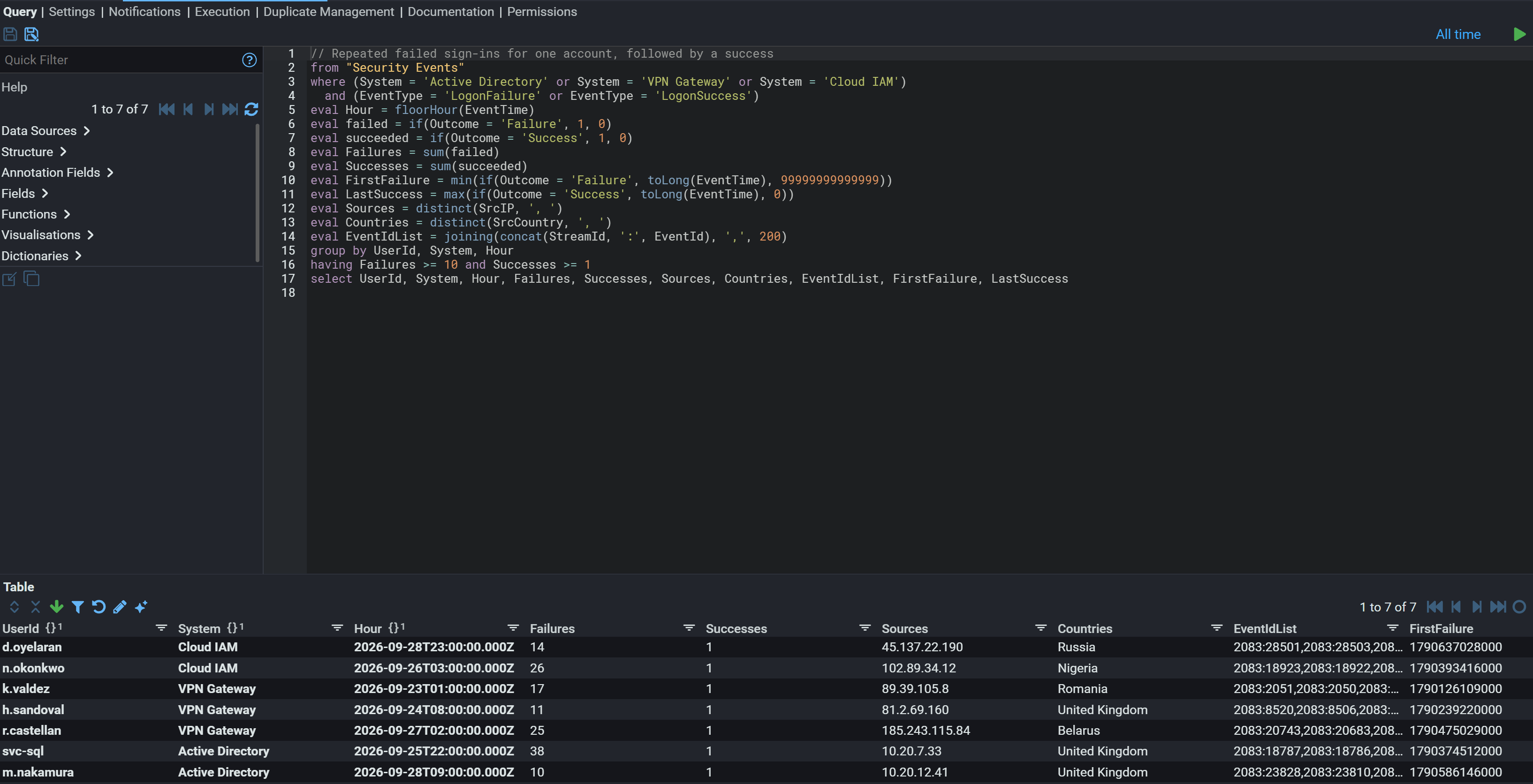
The query tab of a Stroom analytic rule. On the left, the help panel listing data sources, structure, annotation fields, fields, functions, visualisations and dictionaries. In the editor, a StroomQL query commented as repeated failed sign-ins for one account, followed by a success: from Security Events, where the system is Active Directory, VPN Gateway or Cloud IAM and the event is a logon failure or success, it counts failures and successes per account, system and hour, collects source addresses and countries, and keeps accounts with at least ten failures and one success. Below, the table of what it matches across all stored data: seven accounts, each with its system, hour, failure count, single success, source address and country, among them sign-ins from Russia, Nigeria, Romania and Belarus. Every account and event shown is synthetic.(opens the full-size image in a new tab)
Acting on what you find: an analytic rule, its query run over the data already stored. Synthetic data.

Content, access and audit

Content management

Docs: Content Management

Every pipeline, index, rule and dashboard is a document you can version, share and promote between instances.

The explorer tree and document types
Pipelines, translations, indexes, dashboards, rules and reports are typed documents in one explorer tree, each with its own documentation.
Document history and versions
Every change to a document is audited, and the 7.13 betas add a history view that keeps a snapshot at each change.
Git-backed content
A Git-controlled folder syncs its contents with a branch, path or pinned commit, so content is pulled, pushed and reviewed like code.
Import, export and promotion between environments
Content exports to a zip and imports into another instance through the interface or the API, so you build in development and promote to production.
Content packs and the Content Store
Tested content packs, such as schemas, standard pipelines and visualisations, install from the Content Store and upgrade in place.

stroom-docstorestroom-explorerstroom-gitrepostroom-importexport

Security and access control

Docs: Users, Groups and Permissions

Sign-in through OpenID Connect, and fine-grained control over what each user and group can see and do.

Signing in: internal accounts, SSO and edge authentication
Sign in with Stroom's own accounts or an OpenID Connect provider such as Keycloak, Cognito, Google or Entra ID; the 7.13 betas add authenticating edge proxies.
Users, groups and application permissions
Application permissions, such as managing jobs, exporting data or managing users, go to users or nested groups, so a team's access changes in one place.
Document permissions
Owner, delete, edit, view and use permissions apply per document or folder, and a new user sees nothing until access is granted.
API keys, tokens and sessions
API keys let scripts and client systems call Stroom with a named user's permissions, and can be revoked on their own when no longer needed.

stroom-securitystroom-credentials

Audit and event logging

Stroom audits its own users in the same schema it uses to normalise the data you collect.

The audit trail Stroom keeps of itself
User actions, including API calls, are logged as audit events against a named user, then fed back into Stroom to search like any other data.
The event logging schema
Stroom normalises data into the open event-logging schema, and applications that already produce it need no translation at all.
Change history and who changed what
Every configuration change is attributed to a user and written to the audit log, so you can always answer who changed what, and when.

stroom-event-logging

The permissions tab of a Stroom document, here an analytic rule. Permission visibility is set to show explicit permissions, and the users and groups table lists a single entry: the admin user, with Owner as both its explicit and its effective permission.(opens the full-size image in a new tab)
Content, access and audit: the permissions on a single document.

Running and integrating Stroom

Administration and operations

Docs: Nodes, Jobs and Properties

Cluster-wide control of nodes, jobs and configuration, from the same interface analysts use.

Nodes and clustering
Enable or disable each node and set its master priority, and Stroom shares processing across the nodes with free capacity.
Background jobs and the scheduler
Background jobs run on cron or fixed-interval schedules, and each one can be switched on or off per node.
System properties
Configuration layers built-in defaults, cluster-wide database values and per-node overrides, and many properties change at runtime without a restart.
Monitoring, health checks and troubleshooting
An admin port serves health checks, and screens for jobs, server tasks, caches and database tables help pin down a problem.
Upgrades
On startup Stroom detects its database schema and runs the migrations it needs, so an upgrade can step across several versions at once.

stroom-nodestroom-clusterstroom-jobstroom-config

APIs and integration

REST APIs let other systems query, export and automate what you can do in the interface.

The REST API and its specification
The REST API is published as an OpenAPI specification, with a browsable Swagger UI on every running instance.
Query and search APIs
Scripts can run a structured search against indexes and other data sources, or send a StroomQL query and get CSV back.
Data download and export APIs
One call downloads every stream matching a filter as a single zip with its metadata, and another exports all the content you can read.
Sending results downstream
Pipelines forward processed events to Kafka topics, HTTP endpoints or S3 buckets, and scheduled reports go out by email.

stroom-resourcestroom-querystroom-kafka

Deployment

Docs: Install for Evaluation

Run Stroom on a single host, a cluster or containers, on infrastructure you control.

Self-hosted, in your data centre or your cloud
Run Stroom as a single node or a multi-node cluster, on physical or virtual hosts or in containers, in your data centre or your cloud.
Air-gapped and closed networks
Stroom installs without internet access: images are saved on a connected machine and loaded onto the closed network.
Containers and orchestration
Docker images and Compose stacks give you a working node quickly, and larger deployments run as clusters of hosts or containers.
Sizing and capacity
Start with one node for a small or test environment, and add nodes to spread processing as volumes grow. We can help size it.
The node list in Stroom, showing a two-node cluster: node1a and node2a, each with its cluster base endpoint, build version, ping time, the time it came up, whether it is the master, its priority and whether it is enabled. node1a is the master, both nodes are enabled at the same priority, and both came up two hours before the capture.(opens the full-size image in a new tab)
Running Stroom: the nodes in a two-node cluster.
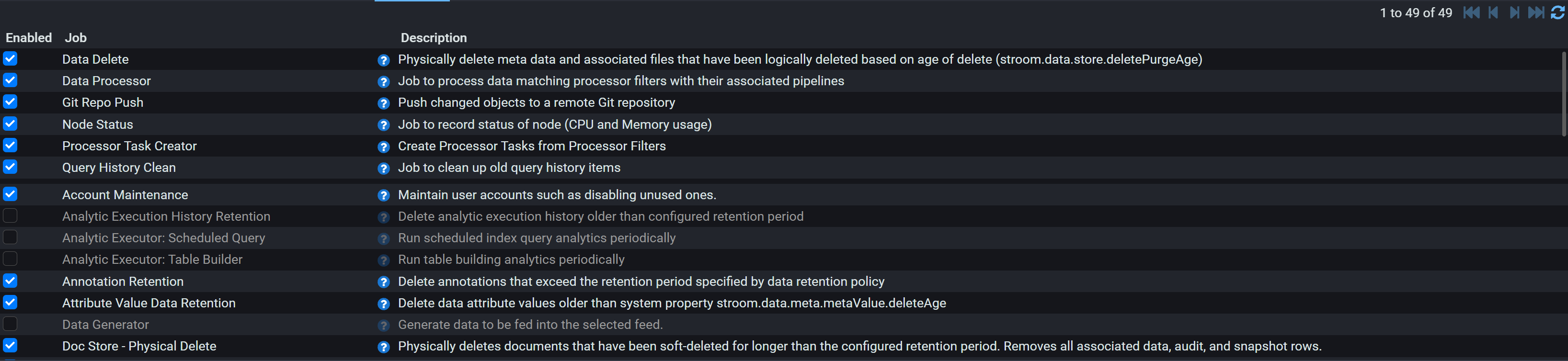
The job list in Stroom, 49 jobs, each with a checkbox showing whether it is enabled and a description of what it does. Enabled jobs include Data Delete, Data Processor, Git Repo Push, Node Status, Processor Task Creator, Query History Clean, Account Maintenance, Annotation Retention, Attribute Value Data Retention and Doc Store Physical Delete. The analytic executor jobs for scheduled queries and table builders, Analytic Execution History Retention and Data Generator are shown greyed out, disabled on this instance.(opens the full-size image in a new tab)
The scheduled jobs those nodes run, and which are enabled.