
Writing a Translation
Going from raw data to validated events, one step at a time, checking each step before building on it.
A translation is built in stages, and each stage can be looked at on its own. Building it that way is much faster than writing the whole pipeline and asking why the output is empty, because every stage has its own ways of failing quietly.
The stages
- Get the data in. Send a sample to a feed. You cannot translate what you cannot read, and real data is reliably stranger than a sample someone described to you.
- Parse it into XML. A DSParser with a Text Converter for text formats, or a parser that reads XML or JSON directly. With a Data Splitter, the output is
records:2. - Reshape it with XSLT. An XSLTFilter turns those records into the schema you are standardising on.
- Validate it. A SchemaFilter confirms the output is what you think it is.
- Write it somewhere, or index it.
Build and check them in that order. A problem at stage 2 produces confusing symptoms at stage 4, and chasing it from the wrong end is where the time goes.
Use the Stepper for all of it
The Stepper runs one record through the pipeline and shows the input and output of every element. It is the single most useful thing in Stroom for this work, because it turns "the output is wrong" into "the output of this element is wrong".
Step first, process second. A processor filter over a million streams tells you much less than one record stepped, and costs much more to undo.
See Debugging pipelines for how stepping behaves.
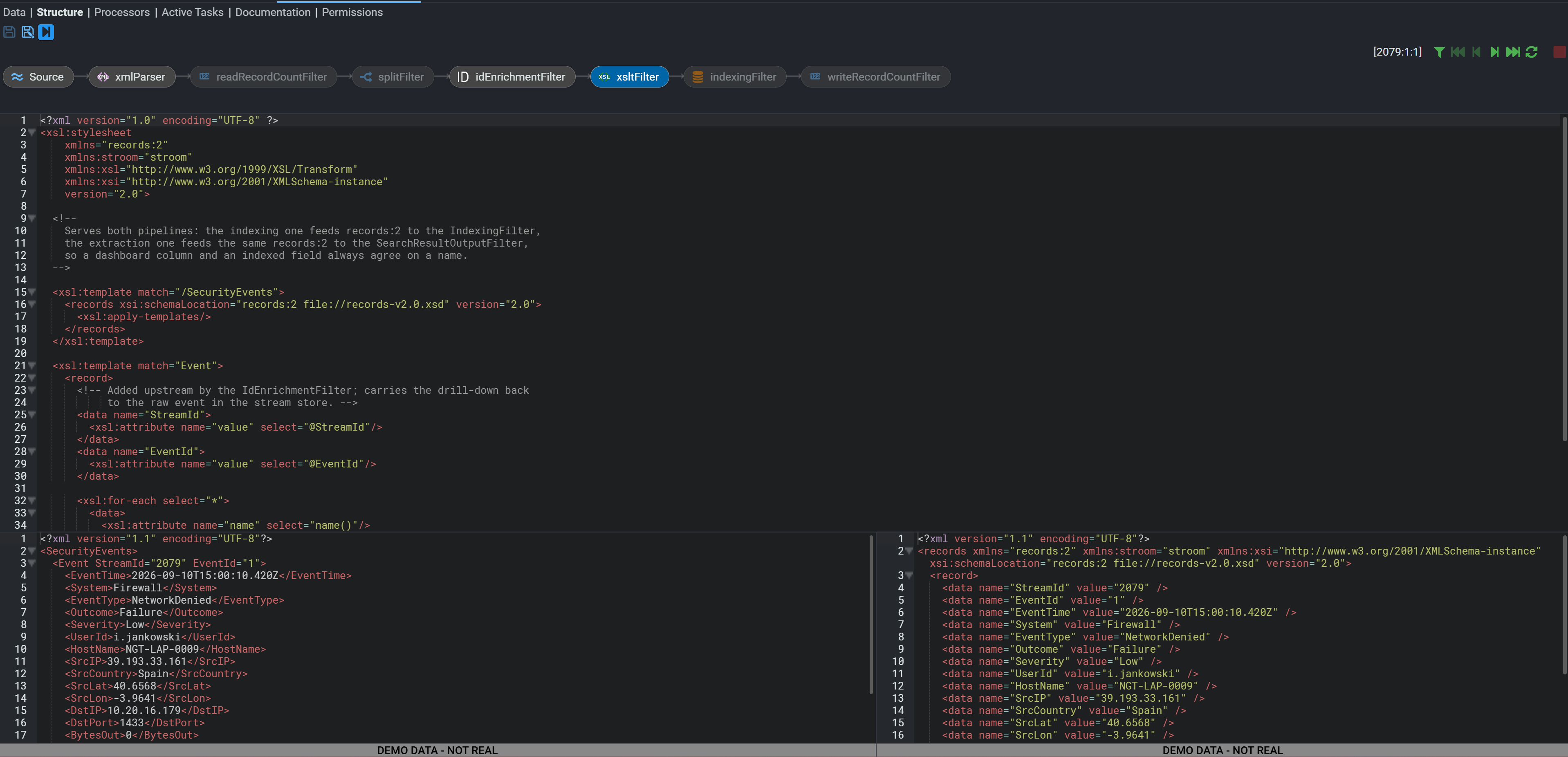
Writing the XSLT
Two practical habits:
- Start from an identity transform and change one thing at a time. An XSLT that emits nothing is almost always a template that never matched, and starting from something that does match makes that obvious.
- Match the input you actually have, not the input you expect. Step the parser, copy what it produced, and write templates against that.
Stroom's own XSLT functions are available for lookups, dates, identifiers and logging. See XSLT functions, and Reference data for enrichment.
How long: immediate
Stepping is interactive: each step runs as you ask for it, against one record. Nothing is stored and nothing is processed, so stepping the same record repeatedly costs nothing and changes nothing.
Processing is the opposite. Once a processor filter is created, output is written and indexed, and undoing it means deleting streams and reprocessing.
Check it worked
Step one record all the way through and read the output of every element, then confirm the final output validates against the schema.
The check that matters most
One known record produces the exact event you intended, and passes schema validation in the same stepped run.
Both halves are needed. Output that looks right but does not validate will be rejected later; output that validates but has fields in the wrong place is valid and wrong.
This does not prove it worked
An XSLT that runs without errors is not proof it did anything. A stylesheet whose templates never match produces empty output and reports no error, which is the single most common translation fault.
One record working is not proof the feed works. Sources vary their format far more than they admit: optional fields, different line endings, occasional multi-line records. Step several records, including one you expect to be awkward.
Fails silently
A template that never matches produces nothing, and that is not an error.
XSLT is declarative: if no template matches, the default behaviour applies and you get either empty output or the text content of the input with no markup. Both look like "the translation did not run".
Check the XSLTFilter's input in the Stepper before suspecting the stylesheet. Nine times out of ten the input is not the shape the templates were written for, often because of a namespace.
Fails silently
Namespaces are the usual reason a template does not match.
Data Splitter output is in the records:2 namespace, and a template matching a bare element name does not match a namespaced one. The stylesheet looks correct, matches nothing, and reports nothing.
Declare the namespace and match on the prefix, or set xpath-default-namespace.
If it isn't working
In order. Each step rules out a class of cause, so don't skip ahead.
- Step the parser first. If stage 2 output is wrong or empty, nothing after it can be right. This is where most problems actually are.
- Is the XSLTFilter's input what the templates expect? Read it in the Stepper rather than assuming.
- Is it a namespace mismatch? The commonest cause of an unmatched template.
- Does the output validate? Turn the SchemaFilter on. A validation message names the element and the expected content, which is usually enough on its own.
- Try several records. A translation that works for one record and fails for the feed is a format variation you have not seen yet.
- Check the processing errors. If it works in the Stepper but fails when processing, read the errors on the stream rather than re-reading the XSLT. See Reading the logs.