
Scheduled Jobs
Every background job Stroom runs, which nodes should run it, and what stops when it is off.
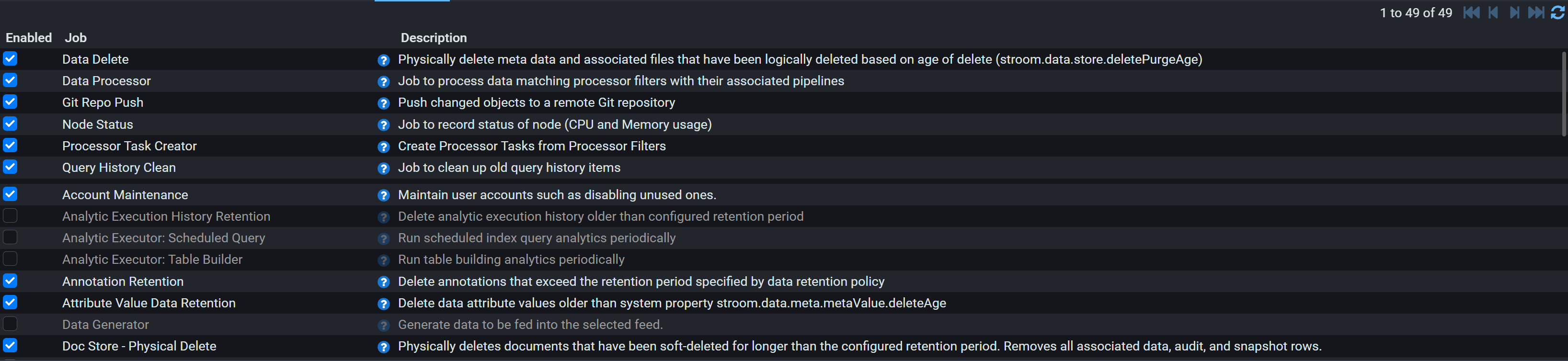
Stroom does most of its work in scheduled background jobs: processing, retention, indexing, statistics and housekeeping are all jobs rather than things that happen by themselves. They are listed under Monitoring → Jobs, where each can be enabled, disabled and rescheduled.
There are 48 jobs you can control, and 7 more that always run.
Warning
A disabled job does not report anything. The work simply never happens, and the symptom turns up somewhere else entirely and much later: data that never merges, streams that are never retained, indexes that never flush, disks that never empty. Before investigating anything that looks like slowness or missing data, check this screen first.
Note
On a new installation, pipeline processing is off. Processor Task Creator ships disabled, and it is the job that turns processor filters into work; Data Processor, which does that work on each node, ships disabled too. Until both are enabled nothing is processed, however many worker nodes are running and however correct the pipelines are, and nothing says so. It is the first thing to check on a system that receives data happily but never processes any.
How jobs and nodes fit together
Each node keeps its own switch for every job. The Jobs screen shows a row per job, which opens to a row per node, so "enabled" is really a decision per node rather than one for the cluster. A new node writes its own set of these rows when it first starts, taking each job's default, which is why a node added later comes up running everything the others do.
The Nodes column in the tables below says what to aim for.
- Every node. The job acts on the node it runs on: its caches, its open files, its share of the index, its own tasks. Turning it off on one node silently stops that part of the work on that node alone, which is the hardest kind of fault to spot: the cluster looks healthy and one node quietly misbehaves. Leave these on everywhere.
- One at a time. The job takes a cluster lock, so although it is enabled everywhere only one node runs it at a time and the rest skip that turn. Leave these on everywhere too: the lock stops duplicate work, and having every node willing to run it means the work still happens when any one node is down. Narrowing one of these to a single node removes that cover without saving anything.
- One node. The work is on shared state and takes no lock, so one node is enough. Leaving these on everywhere is safe rather than harmful (the work is repeated and mostly finds nothing to do), but on a large cluster it is needless database traffic, and confining them to a node or two is a reasonable tidy-up.
Turning a job off
Most of these jobs are housekeeping, and the cost of switching one off is paid later rather than immediately: a table that grows, a disk that fills, an index that drifts out of date. The What it does column says what stops in each case.
Worth turning on deliberately: the analytics and reporting jobs, which do nothing until you use those features, and the two orphan finders, which are diagnostics to run when you suspect the data store and the database disagree.
Worth leaving off: Data Generator, which makes synthetic data, and Java Heap Histogram Statistics, which pauses the JVM while it runs.
Note
After changing a job, confirm it on the same screen: the node row shows its last run and its next scheduled run. A job that is enabled but whose last-run time does not move is a job that is failing rather than working, and the cause will be in that node's logs.
Receiving data
| Job | What it does | Nodes | On by default |
|---|---|---|---|
| Data Generator | Generates synthetic data into a feed. A testing aid: leave it off on a real system. | One node | No |
| S3 Event Notifications Poll | Polls an AWS SQS queue for S3 event notifications. On only if you ingest from S3. | One node | No |
Processing
| Job | What it does | Nodes | On by default |
|---|---|---|---|
| Data Processor | Runs the processing tasks this node claims. Off on a node, that node processes nothing; off on every node, tasks are created and queue up but no stream is ever processed, and nothing reports an error. | Every node | No |
| Pipeline Destination Roll | Closes and rolls this node's open output files on their schedule. Off, rolling destinations on this node stay open and downstream systems see nothing arrive. | Every node | Yes |
| Processor Task Creator | The source of all pipeline processing. With it off, no new tasks are created and processing stops cluster-wide, however many workers are running. | One at a time | No |
| Processor Task Heartbeat | Marks the tasks this node is working on as alive. Off, this node's running tasks look abandoned and another node will take them back and repeat the work. | Every node | Yes |
| Processor Task Manager Release Old Queued Tasks | Frees tasks queued by a master node that has gone. Only does anything when claimTasksOnWorker is off. | One node | Yes |
| Processor Task Queue Statistics | Records queue depth for monitoring. Safe to leave off if you do not chart it. Only does anything when claimTasksOnWorker is off. | One node | Yes |
| Processor Task Reaper | Recovers tasks from a node that died. Off, work in flight on a lost node is never picked up again and those streams are silently never processed. | One at a time | Yes |
| Processor Task Retention | Deletes finished task records. Off, the task table grows without limit and the processing screens get slower. | One at a time | Yes |
Data lifecycle
| Job | What it does | Nodes | On by default |
|---|---|---|---|
| Annotation Retention | Removes annotations past their retention. Off, old annotations stay. | One at a time | Yes |
| Attribute Value Data Retention | Trims stored stream attribute values. Off, that table grows and attribute searches slow down. | One at a time | Yes |
| Data Delete | Does the real deletion of data already marked as deleted. Off, nothing is reclaimed and the volumes keep filling. | One at a time | Yes |
| Policy Based Data Retention | Applies your retention policy. Off, data is kept past its policy, which is usually a compliance question rather than a disk one. | One at a time | Yes |
Storage
| Job | What it does | Nodes | On by default |
|---|---|---|---|
| File System Volume Status | Refreshes how full each data volume is. Off, Stroom writes against stale free-space figures and can fill a volume it believes has room. | One at a time | Yes |
| Orphan File Finder | Reports files on disk with no metadata. A diagnostic: turn it on when you suspect the store and the database disagree, rather than leaving it running. | One at a time | No |
| Orphan Meta Finder | Reports metadata with no files behind it. The same diagnostic from the other side. | One at a time | No |
Indexing
| Job | What it does | Nodes | On by default |
|---|---|---|---|
| Index Shard Delete | Removes shard files already marked deleted from this node's disks. Off, the space is never returned. | Every node | Yes |
| Index Shard Retention | Marks shards past their retention as deleted. Off, old shards are kept and searched. | One node | Yes |
| Index Volume Status | Refreshes free space for the index volumes this node owns. Off, this node can fill an index volume it believes has room. | Every node | Yes |
| Index Writer Cache Sweep | Closes index writers this node has finished with. Off, the node holds file handles and memory it no longer needs. | Every node | Yes |
| Index Writer Flush | Commits this node's index writers to disk. Searches see new documents without it, but off, the Shards tab's Doc Count never updates and uncommitted documents are lost if the node stops without shutting down cleanly. | Every node | Yes |
| Solr Index Optimise | Compacts Solr indexes. Only relevant if you use Solr indexing. | One at a time | Yes |
| Solr Index Retention | Applies deletion queries to Solr indexes. Only relevant if you use Solr indexing. | One at a time | Yes |
State stores
| Job | What it does | Nodes | On by default |
|---|---|---|---|
| Plan B Maintenance Processor | Applies condense and retention rules to this node's shards. Off, shards keep growing. | Every node | Yes |
| Plan B Merge Processor | Merges this node's incoming state batches into its shards. Off, state stores stop advancing and lookups return increasingly stale answers. | Every node | Yes |
| Plan B Shared FS Housekeeping | Clears orphaned directories and unused local copies from the shared store. Only relevant with a shared file store. | Every node | Yes |
| Plan B Shared FS Merge | The shared-filesystem form of the merge. Only relevant with a shared file store. | One at a time | Yes |
| Plan B Snapshot Cleanup | Deletes snapshots nothing is reading. Off, snapshot storage grows. | Every node | Yes |
| Plan B Snapshot Creator | Publishes snapshots other nodes read. Off, readers fall back to older snapshots. | Every node | Yes |
Reference data
| Job | What it does | Nodes | On by default |
|---|---|---|---|
| Ref Data Off-heap Store Purge | Purges old reference loads from this node's own off-heap store. The store is per node, so a node where this is off keeps growing on disk whatever the others do. | Every node | Yes |
Statistics
| Job | What it does | Nodes | On by default |
|---|---|---|---|
| SQL Stats Database Aggregation | Rolls fine-grained statistics up into coarser buckets. Off, the statistics tables grow quickly and statistic queries slow down. | One at a time | Yes |
| SQL Stats In Memory Flush | Writes this node's buffered statistics to the database. Off, this node's statistics are never recorded and are lost on restart. | Every node | Yes |
Analytics
| Job | What it does | Nodes | On by default |
|---|---|---|---|
| Analytic Execution History Retention | Trims the record of past analytic runs. On if you run analytics and want the history bounded. | One node | No |
| Analytic Executor: Scheduled Query | Runs scheduled analytic queries. On only if you use analytics. | One node | No |
| Analytic Executor: Table Builder | Builds the tables scheduled analytics query. On only if you use analytics. | One node | No |
| Process Pathways | Turns trace data into pathways. On only if you use pathways. | One at a time | Yes |
| Reports | Runs scheduled reports. On only if you have reports to run. | One node | No |
Content
| Job | What it does | Nodes | On by default |
|---|---|---|---|
| Doc Store - Physical Delete | Really deletes documents left in the recycle state past their retention. Off, they stay and remain recoverable. | One node | Yes |
| Git Repo Push | Pushes content changes to a remote Git repository. On only if you have set one up. | One at a time | Yes |
| Query History Clean | Trims saved query history. Off, the history table grows. | One node | Yes |
| Reindex Content | Rebuilds the index behind "Find in content". Needed only on nodes serving the user interface, and on shared storage one node of any kind is enough. | One at a time | No |
Identity
| Job | What it does | Nodes | On by default |
|---|---|---|---|
| Account Maintenance | Disables accounts that have gone unused. Only applies to the internal identity provider, and off means dormant accounts stay enabled. | One node | Yes |
| Identity Key Rotation | Rotates the token signing keys. Off, keys are never retired. Internal identity provider only. | One node | Yes |
| Identity Token Purge | Clears expired token rows. Housekeeping only: expired tokens are already refused on every read, so this reclaims space rather than enforcing anything. | One node | Yes |
Node and cluster
| Job | What it does | Nodes | On by default |
|---|---|---|---|
| Java Heap Histogram Statistics | A deep JVM diagnostic that pauses the JVM while it runs. Leave it off unless you are chasing a memory problem and accept the pause. | Every node | No |
| Node Status | Records this node's CPU and memory as internal statistics. Off, that node's figures stop while it carries on working. | Every node | Yes |
| Property Cache Reload | Picks up property changes made on another node. Off, this node keeps running on the values it started with and quietly behaves differently from the rest. | Every node | Yes |
Jobs you do not control
These run on every node and are not listed in the Jobs screen, because there is no useful reason to turn them off: Clear Old Schemas, Delete temp resource files, Evict expired elements, Evict from object pool, Fetch new tasks, Flush Data Attributes To DB, Stepping Store Cleanup.